
What if you could retire your bulky digitising table and convert your entire archive of cardboard slopers into production-ready files using nothing but your smartphone? For most Australian designers, the reality of manual pattern making involves hours of tedious grading and a studio overflowing with physical templates. You've likely felt the frustration of sending a file offshore only to have the factory report errors in the geometry or scaling. It's a bottleneck that delays your time-to-market and eats into your margins.
In this guide, you'll discover how a modern pattern digitizing tool transforms physical garment patterns into precise digital assets with incredible speed. We'll show you how to eliminate storage headaches and achieve perfectly graded size ranges in seconds. We'll also examine the hardware-free shift occurring in 2026, the mechanics of automatic grading, and how to export the exact file types your manufacturer actually needs. By the end of this article, you'll understand how to select a software-driven workflow that ensures your next collection moves from concept to rack faster than ever before.
Key Takeaways
- Learn how modern software has replaced bulky digitising tables, allowing you to convert patterns anywhere using a smartphone.
- Understand how AI-driven technology accurately recognises grain lines, notches, and complex outlines from a single digital capture.
- Discover how a pattern digitizing tool scales your designs with automatic grading to ensure perfectly sized ranges every time.
- Master a professional workflow that transforms physical cardboard slopers into the precise, industry-standard files required by global factories.
- Optimise your production timeline by eliminating manual grading hours and reducing communication errors with offshore manufacturers.
What is a Pattern Digitizing Tool and Why Your Brand Needs One
A What is a Pattern Digitizing Tool is a software solution that converts physical garment patterns into precise digital vectors. For decades, the industry relied on digitising tables that cost thousands of dollars and occupied massive amounts of floor space. Modern Australian labels are now choosing agile, photo-based software instead. This shift allows you to ditch heavy cardboard slopers and move your entire archive to the cloud. It's a cleaner way to work that supports sustainable fashion by reducing paper waste and physical storage footprints. By digitising your library, you ensure your intellectual property is safe from fire, flood, or simple wear and tear.
The Problem with Manual Pattern Management
Physical patterns are fragile. They degrade over time, warp in high humidity, and are notoriously difficult to organise. If you're working with makers in Bali, China, or interstate, sharing physical assets is a logistical nightmare. You're stuck paying for international couriers and waiting days for delivery. Manual grading adds another layer of cost. Hiring a specialist to hand-grade every size in your range is slow and expensive, often delaying your time-to-market. These manual processes also increase the risk of communication errors with factories, as paper patterns can be misread or damaged during the production setup.
Core Benefits of Going Digital
Digitising gives you instant access to your entire library of blocks and slopers. You can search, duplicate, and modify patterns without ever touching a pair of scissors. Digital tools offer enhanced accuracy through point-to-point measurement, eliminating the human error found in manual tracing. This transition allows for a more responsive design process where you can update a master block once and have those changes reflect across your entire digital ecosystem instantly.
- Access files from any device, anywhere in the world.
- Ensure consistency across different manufacturing runs.
- Integrate directly with automated grading and tech pack tools.
Terminology: Slopers, Blocks, and Vectors
Understand the difference between a digital sketch and a production-ready pattern. A sketch is a visual reference, while a vector pattern is a technical blueprint. Vector files are essential for manufacturing because they scale without losing resolution. A high-quality pattern digitizing tool ensures 1:1 scale accuracy, meaning your digital assets are identical to your original physical master. This precision is what makes the file ready for a factory's automated cutting machine. Without vector data, factories can't guarantee the fit or finish of your garment across a full size range.
From Cardboard Slopers to Cloud: How a Modern Pattern Digitizing Tool Works
Technology in the apparel industry has transitioned from manual tracing to sophisticated computer vision. While academic research into 3D body scanning and design technologies often focuses on consumer fit, digitising tools focus on the production blueprint. A modern pattern digitizing tool uses high-contrast detection to identify the exact perimeter of your cardboard slopers. It doesn't just take a photo; it interprets the geometry. Algorithms now recognise specific pattern markings such as notches, grain lines, and drill holes with millimetre precision. This evolution means you no longer need a dedicated room for a digitising table or an expensive flatbed scanner.
Ensuring scale accuracy is the most critical part of the process. To achieve a 1:1 ratio, the software uses simple reference markers placed within the frame. These markers allow the system to calculate the exact pixels-to-millimetre relationship regardless of the distance between the camera and the pattern. It removes the guesswork from the digital conversion, ensuring that a size 10 master remains a size 10 in the digital space. Transitioning to this digital library is simpler than most labels think. You can explore how cloud-based digitising works to see these efficiency gains firsthand.
The Photo-Based Digitising Process
Capturing your patterns is now as simple as using a smartphone. You place your pattern on a flat surface with a contrasting colour and snap a photo. The software performs automatic edge detection, instantly separating the pattern shape from the background. It also identifies internal marks, such as darts and pleat lines, without manual input. To ensure perfect accuracy, the software utilizes advanced geometric correction algorithms that eliminate lens distortion and perspective warping in a single step. This ensures the digital file is a flat, true representation of the original physical piece.
Cloud Storage and File Management
Cloud-based management is essential for remote design teams. Digital libraries allow you to organise your assets by season, collection, or specific garment types. This eliminates the physical clutter of a traditional studio and makes searching for a specific block instantaneous. Version control is another major advantage of a digital pattern digitizing tool. You can save multiple iterations of a design as you refine the fit, making it easy to revert to a previous version if needed. This level of transparency allows team members in different locations to collaborate on the same library in real-time, ensuring everyone is working from the most current master file.
Hardware-Free vs. Traditional Digitising: Comparing Your Options
Choosing between a physical digitising table and a modern software-first approach is a critical decision for any growing label. Traditional hardware requires a significant upfront investment. High-end systems like the CadShot Vision start at approximately A$9,700 for the module alone, with ongoing annual software fees. When you add the cost of a dedicated industrial CAD license, the initial setup can easily exceed A$10,000. For small to medium Australian studios, this capital expenditure often feels like a barrier to modernisation. A software-based pattern digitizing tool removes this financial hurdle by shifting the focus from expensive sensors to intelligent cloud processing.
Space is another hidden cost of traditional equipment. A standard digitising table occupies roughly two to three square metres of floor space. In high-rent Australian design centres, every square metre counts. Dedicating a large area to a piece of furniture that only performs one task is inefficient. Software-only tools require no additional footprint, allowing you to turn any flat cutting table into a digitising station. You also avoid the ongoing burden of hardware maintenance. Physical scanners and tables require regular calibration and technical support to remain accurate, whereas cloud-based tools receive automatic updates without any downtime or technician visits.
The Hidden Costs of Traditional Hardware
Beyond the price tag, legacy hardware comes with a steep learning curve. Traditional industrial CAD systems are notoriously complex, often requiring weeks of specialised training before a staff member can operate them effectively. This creates a bottleneck in your production line. If your only trained operator is away, your digitising stops. Physical hardware also limits your speed. You're forced to digitise one pattern piece at a time, manually clicking points around the perimeter. Modern software allows for bulk photo uploads, processing multiple pieces simultaneously and cutting your development time by up to 70%.
Why Software-First is the Future for Scaling Brands
Agility is the primary advantage of a software-first pattern digitizing tool. Startup fashion labels can access professional-grade digital assets without the five-figure entry price. This portability allows you to digitise patterns from any location with a camera, whether you're at your home studio, a factory floor, or a fabric supplier. New features and algorithmic improvements are delivered via the cloud instantly. You don't need to purchase a new scanner to benefit from better edge detection or faster grading. This ensures your brand stays at the forefront of technology as you scale your collections.
- Eliminate expensive hardware maintenance and calibration fees.
- Reclaim valuable studio space for design and sampling.
- Scale your production capacity without increasing your physical footprint.
- Enable remote collaboration by keeping your pattern library in the cloud.
A Professional Workflow: From Photo to Production-Ready Grading
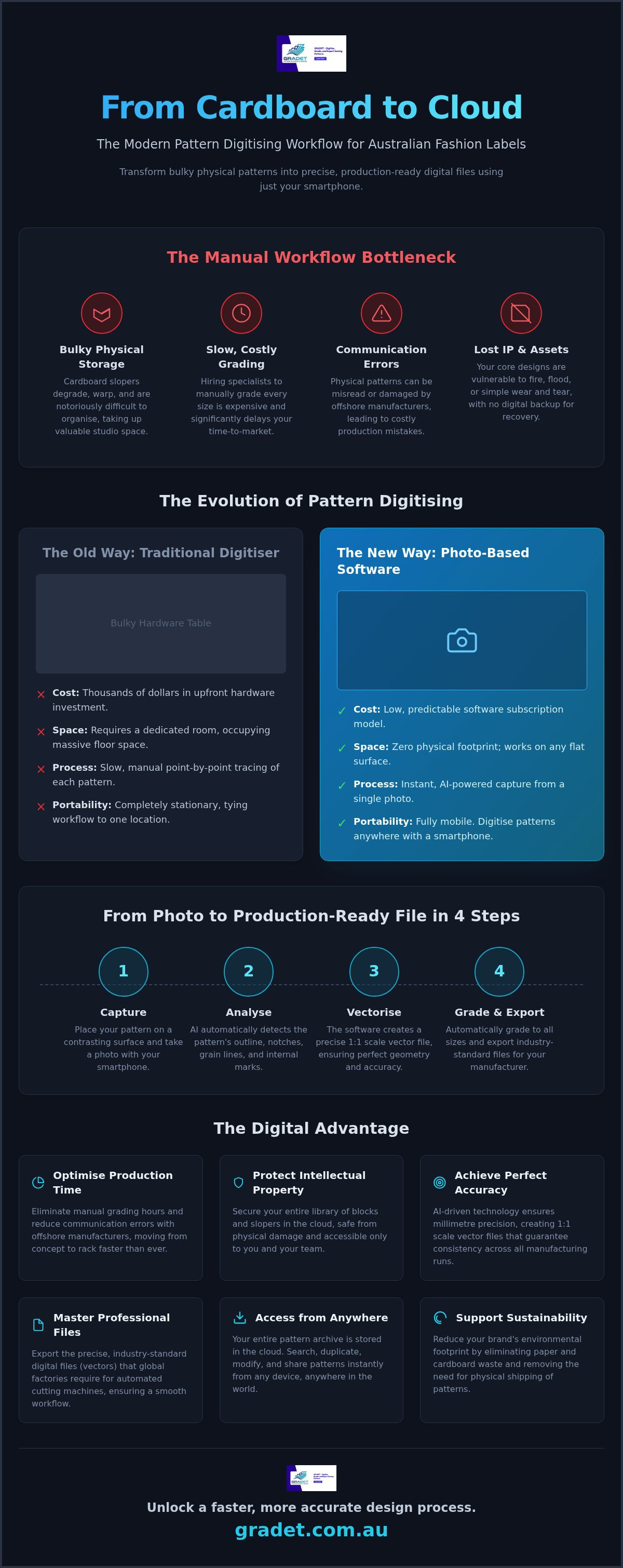
Adopting a digital workflow requires a shift from manual tracing to a structured, four-step sequence. This progression ensures that your physical craftsmanship is preserved while gaining the speed of modern automation. By following a methodical approach, you eliminate the risk of human error that typically occurs during manual redrawing. A professional pattern digitizing tool acts as the central hub for this transition, turning a single photograph into a comprehensive, multi-size production file. This integrated process is what allows agile Australian labels to move from a master block to a full size range in a fraction of the traditional time.
Preparing Your Patterns for Digitising
Success begins with the quality of your physical preparation. Place your cardboard sloper on a flat surface that provides high contrast, such as a dark pattern on a light background. Ensure all grain lines, notches, and drill holes are marked clearly with a bold pen. These internal markings are essential for the software to interpret the technical requirements of the garment. You must also place reference scale markers within the frame. These markers provide the geometric data needed for 100% accurate conversion, ensuring the software maintains the exact millimetre dimensions of your original piece.
Automatic Grading: Scaling Your Designs in Seconds
Traditional methods treat grading as a separate, manual task often performed in generic illustration software. This is where most errors occur. A modern pattern digitizing tool integrates grading directly into the digitising process. You define your brand's unique size chart once, and the software applies consistent growth rates across all points of the pattern. It eliminates the need to redraw every size manually, saving hours of labour per style. You can verify the fit and proportions of the entire range digitally, making adjustments to the master block that ripple through all sizes instantly. To see this speed in action, you can start digitising your collection today and skip the manual grading bottleneck.
Exporting Files Factories Actually Want
Digital patterns are only useful if your manufacturer can use them without friction. Professional tools export industry-standard formats including DXF, PDF, and ASTM files. These standards are universally accepted by global factories and automated cutting rooms. Beyond the pattern itself, you can generate comprehensive tech packs that include construction details, seam allowances, and material requirements. Providing these production-ready assets reduces the back-and-forth communication with makers. When a factory receives a clean, digitally graded file, they can move straight to sampling or bulk production with total confidence in the fit.
- Standardise your size ranges for consistent brand fit.
- Reduce lead times by automating the most repetitive tasks.
- Ensure your intellectual property is stored in a factory-ready format.
- Minimise material waste through precise digital marker making.
Choosing GRADET: The Leading Pattern Digitizing Tool for Australian Labels
GRADET bridges the gap between traditional manual craftsmanship and high-speed digital precision. While many global competitors focus on industrial-scale hardware, our pattern digitizing tool prioritises the agility required by the local Australian market. We understand that labels here need to move fast without sacrificing the nuances of their master blocks. By removing the requirement for specialised training or five-figure hardware setups, we empower designers to take full control of their digital assets. Startups benefit from a low barrier to entry, while established brands use our platform to synchronise their archives across multiple design teams. This versatility makes GRADET a reliable partner throughout your entire growth cycle, acting as a central hub where physical designs become versatile, production-ready data in minutes.
Designed for Australian Designers
Our interface is built for designers, not just software engineers. It respects the heritage of pattern making while providing the tools needed for modern scalability. Whether you are a solo founder or an established brand, the platform supports local manufacturing standards and terminology. This ensures that when you send a file to any local maker or factory, the technical data is clear and actionable. You fast-track the transition from a physical concept to a production-ready file, reducing the friction that often stalls new collection launches. By speaking the language of the local apparel industry, GRADET simplifies the shift from cardboard to cloud.
The GRADET Advantage: Speed, Accuracy, and Efficiency
Efficiency is the cornerstone of the GRADET experience. Automation allows you to reduce pattern development time by up to 80%, freeing your team to focus on creative direction rather than manual data entry. Our proprietary photo-conversion technology ensures 100% scale accuracy, maintaining the integrity of your original fit across every size. This all-in-one cloud solution integrates digitising, grading, and tech pack generation into a single, streamlined workflow. You no longer need to jump between different software packages to prepare a collection for manufacturing. Book a demo with GRADET today to see our pattern digitizing tool in action.
- Accelerate your collection launches with automated grading and file exports.
- Maintain total fit consistency across your entire digital library.
- Eliminate the logistical burden of storing and shipping physical cardboard slopers.
- Empower your design team with professional-grade tools that require zero hardware investment.
Modernise Your Design Studio for 2026
The shift toward digital workflows is redefining how Australian labels compete on the global stage. You've seen how removing the physical constraints of cardboard slopers and A$10,000 digitising tables allows for a more agile, responsive design process. By adopting a modern pattern digitizing tool, you ensure that your intellectual property is secure, scalable, and ready for immediate manufacturing. It's time to trade the logistical nightmare of physical storage for the clarity of a production-ready archive.
Speed and precision are the new industry standards. Automated grading creates instant size ranges with total consistency, while a cloud-based library keeps your entire brand history accessible from any location. This isn't just about digitising; it's about building a foundation for sustainable growth and faster collection cycles. You can now streamline your workflow with GRADET’s pattern digitizing tool and reclaim your studio space today. Your craftsmanship deserves a digital home that matches your ambition.
Frequently Asked Questions
Do I need a special camera to use a pattern digitizing tool?
No, you don't need expensive photography gear or specialised industrial scanners. Most modern smartphone cameras provide more than enough resolution to capture the fine details of your patterns. The software handles the heavy lifting by identifying edges and internal markings automatically. As long as you have good natural lighting and a steady hand, your phone becomes a powerful professional tool that rivals industrial hardware setups without the high price tag.
Is photo-based digitising as accurate as a traditional digitising table?
Accuracy is maintained through the use of reference markers and advanced geometric correction. While traditional tables rely on manual point clicking, a modern pattern digitizing tool uses algorithms to eliminate lens distortion and perspective warping. This ensures a true 1:1 scale conversion. You get millimetre precision without the risk of human error associated with manual tracing or the physical wear and tear of legacy hardware components found in older studios.
What file formats should I export for my garment manufacturer?
You should always check with your factory first, but industry standards are the safest bet for global production. Most manufacturers prefer DXF (Drawing Exchange Format) for automated cutting machines or PDF for manual cutting. High-quality software also supports ASTM standards to ensure compatibility with various industrial CAD systems. Providing these production-ready files reduces communication errors and ensures your patterns are interpreted exactly as you designed them during the sampling phase.
Can I digitise cardboard slopers or just paper patterns?
Both materials work perfectly as long as there is high contrast between the pattern and the background. Cardboard slopers are actually ideal because their rigid edges are very easy for the software to detect. Whether you are using traditional brown card or white paper, the key is ensuring the outline is sharp and clear. This versatility allows you to digitise your entire archive of legacy blocks regardless of the material they were originally cut from.
How does automatic pattern grading work with digitised files?
Once your master block is digitised into a vector format, the software applies mathematical growth rules to specific points on the pattern. You define your brand's unique size chart, and the system scales the design across your full range in seconds. This eliminates the need to manually redraw every size. It ensures that the fit remains consistent from a size 6 to a size 20, maintaining the original design's proportions and technical integrity.
Do I need to be a CAD expert to use pattern digitising software?
You don't need a background in complex industrial engineering to modernise your workflow. Modern platforms are designed with a user-friendly interface that respects the craft of traditional pattern making. The software guides you through the capture and extraction process, making it accessible for designers of all skill levels. It bridges the gap between manual skills and digital efficiency, allowing you to focus on design rather than struggling with dense technical jargon or complex coding.
Can I use a pattern digitizing tool for leathercraft or non-apparel items?
Yes, this technology is suitable for any flat pattern used in manufacturing. Leathercraft professionals, bag designers, and upholstery makers use a pattern digitizing tool to convert their templates into digital assets. If the item has a clear outline and can be laid flat for a photo, it can be digitised. This precision is particularly valuable for complex accessories where small variations in scale can impact the final assembly and finish of the product.
